

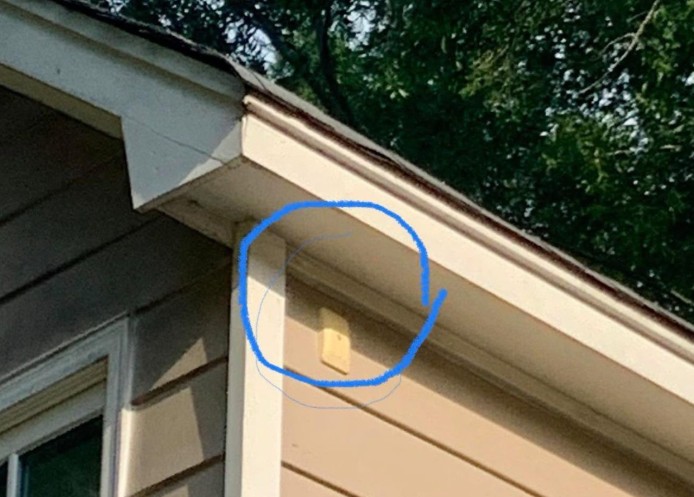
A DSC alarm status module is connected to the main control panel of the security system. It acts as a visual indicator, allowing homeowners, service technicians, and sometimes even neighbors or passersby to see whether the alarm system is active, has recently been triggered, or may require attention.
The exact meaning of the lights can vary depending on the system model and how it was installed, but the colors often indicate the following:
Flashing Red Light
A red flashing light may indicate that the alarm has recently been activated. In some systems, it can also point to a fault, tamper alert, or communication issue. For example, the system may have detected interference, a disconnected component, or a problem with cellular or network communication.
Flashing Yellow or Amber Light
A yellow or amber flashing light usually suggests that the system needs attention. This may be related to a low battery, a service warning, or another technical issue that should be checked on the main alarm panel.
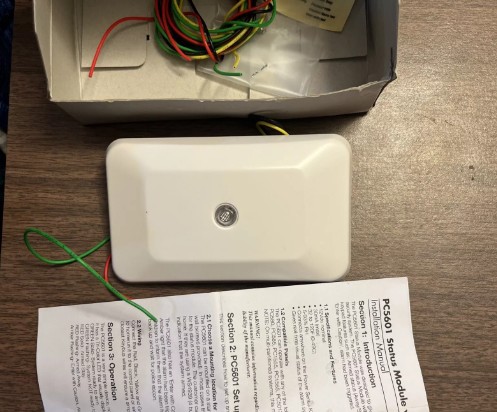
Why Is It Installed Outside the Home?
The module is often mounted outside so that the system’s status can be seen without entering the property. This can be useful for homeowners, alarm technicians, and emergency responders.
It may also serve as a visible deterrent. A flashing security indicator can signal that the property is protected by an active alarm system, which may discourage potential intruders.
What Should You Do If the Light Keeps Flashing?
If the red or yellow light continues flashing and you are unsure why, check the main alarm keypad or control panel inside your home. Most alarm systems display messages, warning lights, or error codes that can help identify the issue.
You should also consult your alarm system manual for the specific meaning of each light pattern. Since different DSC systems may be programmed differently, the same color may not always mean the same thing in every installation.
If the panel shows a trouble message, communication failure, low battery warning, or tamper alert, it is best to contact your alarm monitoring company or a qualified security technician.
Final Thought
A flashing red or yellow DSC alarm status module should not be ignored. While it may simply be a routine warning or system notification, it can also indicate that your security system needs service.
Checking the main alarm panel and addressing the issue promptly helps ensure your home security system remains reliable and ready to protect your property.